


🌐 Language: 🇻🇳 Tiếng Việt · 🇬🇧 English (current)
Introduction to the GP247 System API
Introduction
This document introduces the GP247 API (Application Programming Interface) system — how external applications (mobile apps, other websites, management software, third-party integrations…) can "talk" to your GP247 site to fetch data and perform actions. It is written for integration developers and site administrators who want a big-picture view of what the API offers, how it is grouped, how authentication (login) works, and how to try it out. After reading, you will know which API does what, at which address, and what key it needs, with copy-and-run examples.
ℹ️ What is an API (in plain terms): think of the API as a "service counter" for your site. External apps don't reach straight into the data store; they send a request to the counter (a URL address), the counter checks the credentials (token/key), then returns the result as JSON (a text-based data format that computers can read). The whole exchange happens over the ordinary web protocol (HTTP).
1. The two main API groups
The GP247 system splits its API into two groups, serving two different audiences:
| Group | Address prefix | For | Who logs in |
|---|---|---|---|
| Core API (Admin) | api/core |
Remote system administration (management apps, custom dashboards) | Administrator accounts |
| Front API (Storefront) | api/front |
Displaying store data, customer accounts | Guests/members, or no login needed for public data |
api/coreis provided by thegp247/corepackage — "back-end" operations such as admin login and fetching administrator information.api/frontis provided by thegp247/frontandgp247/shoppackages — "storefront" data such as product, category and brand lists, content pages, banners, and customer accounts/orders.
The full address = your site domain + prefix + path. For example, if your site is
https://shop.example.com, the endpoint for the product list is:https://shop.example.com/api/front/product/list.
2. Authentication (logging in to the API)
GP247 uses Laravel Sanctum to issue a token (a long string that acts as an "entry ticket"). The mechanism is the same for both groups:
-
The app sends username/email + password to the
loginendpoint. -
If correct, the system returns an
access_token(a Bearer token) with an expiry (expires_at). -
From then on, every request that requires login attaches this token in the header:
Authorization: Bearer <access_token> -
To sign out, call the
logoutendpoint to revoke the token (the old token becomes invalid immediately).
Scopes (abilities)
Each token is issued with a scope that limits what it can do:
| Scope | Meaning |
|---|---|
admin |
Regular administrator (Core API) |
admin-supper |
High-level administrator — the administrator role (Core API) |
user |
Activated member (Front API) |
user-guest |
Not-yet-activated member / guest (Front API) |
Remember me (remember_me)
When calling login, if you send remember_me = true, the token lasts longer (default 30 days,
configured via the GP247_API_RECOMMEMBER environment variable). Otherwise, the token expires per
the default (7 days, via GP247_API_TOKEN_EXPIRE_DEFAULT).
3. The API Connection protection layer — optional
Beyond the token, GP247 also has an extra lock standing in front of all APIs, called the API Connection. It is a second "gatekeeper" ensuring only authorized applications can call the API — even the public endpoints.
-
This layer can be turned off/on via the
api_connection_requiredsetting in the admin area. -
When enabled: every request must additionally carry two headers:
apiconnection: <connection code> apikey: <secret key> -
The
apiconnection/apikeypair is created and managed in the GP247 admin area (the API Connection management section); each pair can have an expiry date (expire) and an on/off status (status). -
If missing or wrong, the API returns
{"error": 1, "msg": "Connection not correct"}.
The order of the checking layers (middleware) is: return JSON → check API Connection → rate-limit 1000 requests. This order is fixed and should not be changed.
4. Core API workflow (Admin)
The diagram below shows the sequence of a management app calling the Core API: check the connection (if enabled) → log in to get a token → call admin endpoints with the token attached.
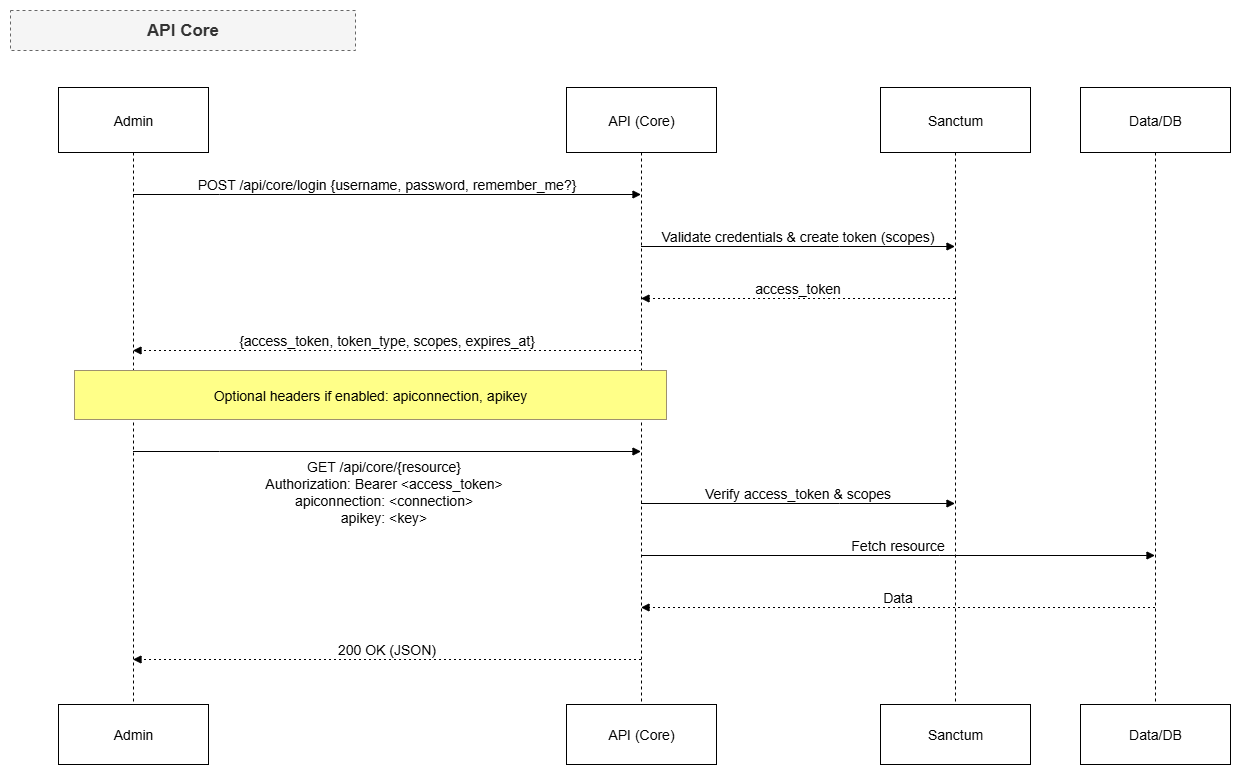
Core API endpoints (prefix api/core):
| Method | Path | Login required | Function |
|---|---|---|---|
POST |
api/core/login |
No | Admin login, returns access_token |
GET |
api/core/logout |
Yes (Bearer) | Log out, revoke the current token |
GET |
api/core/info |
Yes (Bearer) | Get the currently logged-in administrator's info |
Example admin login (using curl in a Terminal):
curl -X POST "https://shop.example.com/api/core/login" \
  -H "Content-Type: application/json" \
  -d '{"username":"admin@example.com","password":"your-password","remember_me":true}'
On success, you receive JSON like:
{
  "access_token": "1|aBcD...very-long...XyZ",
  "token_type": "Bearer",
  "scopes": ["admin-supper"],
  "expires_at": "2026-08-29 10:00:00"
}
Then fetch the admin info using the token you just received:
curl -X GET "https://shop.example.com/api/core/info" \
  -H "Authorization: Bearer 1|aBcD...very-long...XyZ"
5. Front API workflow (Storefront)
The Front API serves two kinds of data: public data (no login needed — product lists, categories…) and customer-private data (login required — orders, personal info).
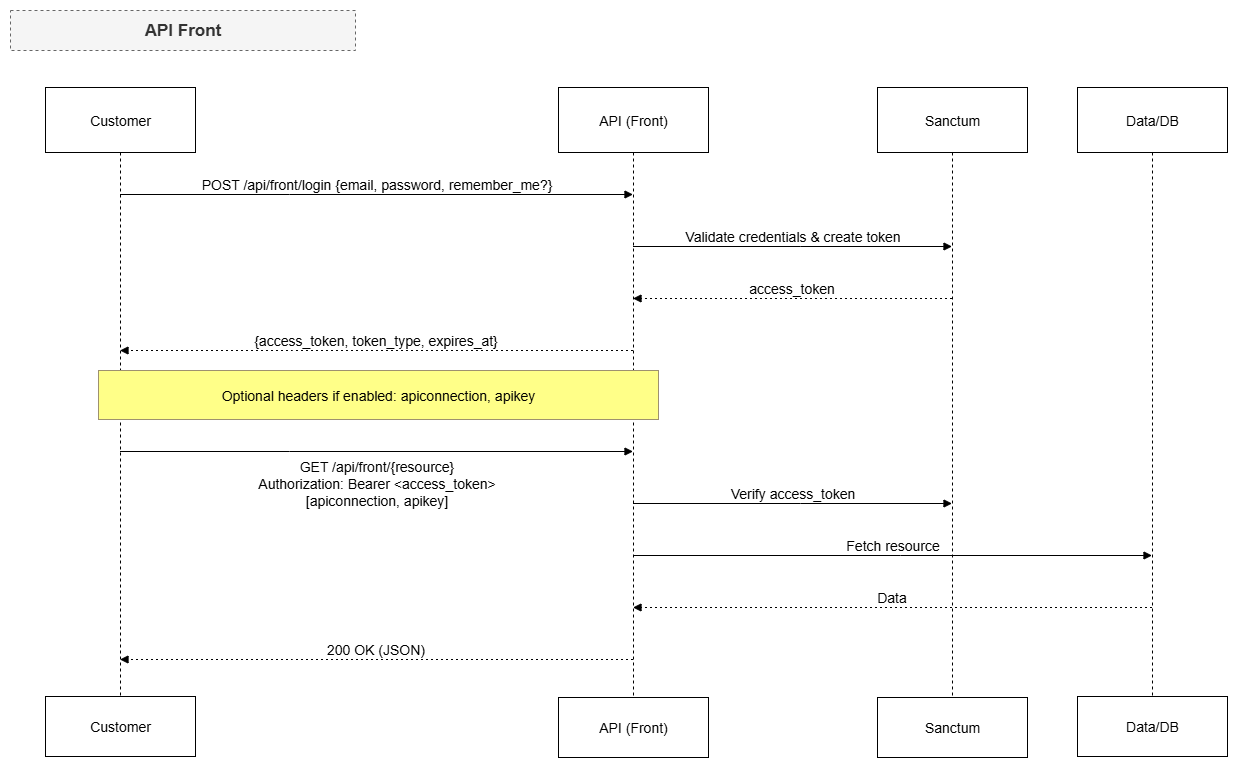
Public endpoints (prefix api/front, no token needed):
| Method | Path | Function |
|---|---|---|
GET |
api/front/product/list |
Product list |
GET |
api/front/product/detail/{id} |
A product's details |
GET |
api/front/category/list |
Category list |
GET |
api/front/category/detail/{id} |
A category's details (with products) |
GET |
api/front/brand/list |
Brand list |
GET |
api/front/brand/detail/{id} |
A brand's details |
GET |
api/front/banner/list |
Banner list |
GET |
api/front/banner/detail/{id} |
A banner's details |
GET |
api/front/page/list |
Content page list |
GET |
api/front/page/detail/{id} |
A content page's details |
Customer account endpoints (prefix api/front, customer token required):
| Method | Path | Login required | Function |
|---|---|---|---|
POST |
api/front/login |
No | Log in with customer email/password, returns a token |
GET |
api/front/logout |
Yes (Bearer) | Log out the customer |
GET |
api/front/info |
Yes (Bearer) | Customer account info |
GET |
api/front/member/order/list |
Yes (Bearer) | The customer's order list |
GET |
api/front/member/order/detail/{id} |
Yes (Bearer) | An order's details |
Example fetching the product list (public, no token needed):
curl -X GET "https://shop.example.com/api/front/product/list" \
  -H "Accept: application/json"
Example logging in a customer and viewing their orders:
# 1) Customer login
curl -X POST "https://shop.example.com/api/front/login" \
  -H "Content-Type: application/json" \
  -d '{"email":"customer@example.com","password":"your-password"}'

# 2) Use the returned token to fetch the order list
curl -X GET "https://shop.example.com/api/front/member/order/list" \
  -H "Authorization: Bearer 2|zzz...customer-token...zzz"
6. Response format & error codes
- Every response is JSON (thanks to the
json.responsemiddleware). - Paginated endpoints (such as the product list) return Laravel's standard pagination shape
(with
data,current_page,total…). - Common errors:
| Case | Response |
|---|---|
| Wrong username/password | HTTP 401 — {"error": 1, "msg": "Unauthorized"} |
| Missing/invalid API Connection | {"error": 1, "msg": "apiconnection or apikey not found"} or "Connection not correct" |
| Data not found (detail) | HTTP 404 with an empty body |
| Too many requests | HTTP 429 (rate limit exceeded) |
Q&A
Q1: Which API group should I use?
→ If you're building an app/customer client for the store (browse products, place orders, view orders)
→ use the Front API (api/front). If you're building a remote admin tool → use the
Core API (api/core).
Q2: Where do I get a token and how long does it last?
→ The token is issued by the login endpoint. By default it expires after 7 days; sending
remember_me = true extends it (default 30 days). You can change these via the
GP247_API_TOKEN_EXPIRE_DEFAULT and GP247_API_RECOMMEMBER environment variables.
Q3: How is apiconnection/apikey different from access_token?
→ The access_token authenticates the user (who you are). The apiconnection/apikey
authenticates the application (which app is allowed to call the API) and is an optional layer
— only required when the admin enables api_connection_required.
Q4: Do public endpoints need a token?
→ No. The product/category/brand/banner/content-page list and detail endpoints are public. But if the
API Connection layer is enabled, you must still send the apiconnection/apikey headers.
Q5: I get an Unauthorized (401) error even with the right password?
→ For the Core API, the admin account must have status = 1 (active). For the Front API, check that the
email is correctly registered. Also make sure you send the right field: Core uses username, Front
uses email.
Q6: Why do I get a Connection not correct error?
→ The API Connection layer is enabled and your apiconnection/apikey pair is wrong, expired
(expire), or disabled (status). Go to the GP247 admin area, API Connection management, to check or
re-create it.
Q7: Is there a request limit?
→ Yes. The middleware limits to 1000 requests per cycle by default. Exceeding it returns HTTP 429
— pace your requests or cache the results on the app side.
Q8: How do I write a full endpoint address?
→ https://<site-domain>/<prefix>/<path>. For example:
https://shop.example.com/api/front/product/list. The prefix is api/core or api/front depending
on the group.
Q9: How do I log out safely?
→ Call logout (api/core/logout or api/front/logout) with the current token. The system deletes
that token from the database, so the old token can no longer be reused.
Q10: I need an endpoint that isn't in the list?
→ The lists above are the built-in endpoints of core/front/shop. If you need more, a developer can
extend them by declaring routes in a separate plugin — without modifying the core (following GP247's
"plugins plug into the core" principle).
📅 Last updated: 2026-07-30 · ✍️ Author: GP247