🌐 Language: 🇻🇳 Tiếng Việt · 🇬🇧 English (current) · 🇯🇵 日本語
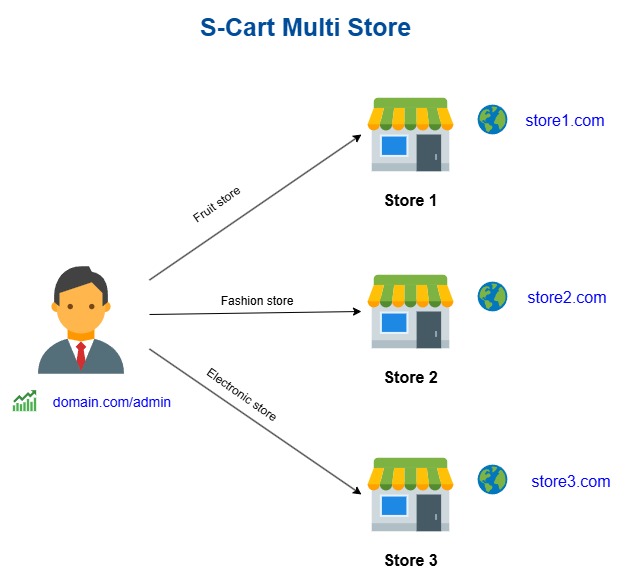
S-Cart Multi-Store — One admin, many sales websites
🚀 Link MultiStore PRO: https://gp247.net/en/product/multi-store-pro.html
Introduction
Multi-Store is a plugin that lets a business run multiple sales websites from a single admin system. This document is for business owners and operations managers (no technical background needed): after reading it you will understand what Multi-Store is for, the value it brings, how it differs from Multi-Vendor, and how the Free edition differs from Pro so you can pick the right fit.
1. What Multi-Store is and the problem it solves
When a business wants several different stores/websites — for example one domain per brand, one language/currency per market, or separate wholesale and retail sites — the usual approach is to build several standalone websites. The result: scattered data, many logins to manage, higher maintenance cost, and no single overview.
Multi-Store brings everything into one place:
- Many stores, one admin. Each store has its own domain, its own interface (template), its own language and currency — yet you manage them all from a single admin panel.
- Shared platform. Products, orders, and customers live in one system; no need to rebuild from scratch for each website.
- Lower cost and effort. Install once, operate in one place, update in one place — instead of maintaining several separate websites.
- Grow gradually. Start with one store and add new ones when needed, without rebuilding the system.
👉 Try it live on the demo site: https://demo.s-cart.org
2. How Multi-Store differs from Multi-Vendor
These are two different business models, and they cannot be installed together on the same website (the system blocks it to prevent data conflicts). Pick the right model:
| Criteria |
🏢 Multi-Store |
🛒 Multi-Vendor |
| Who owns the goods |
One owner (your business) |
Many independent vendors selling together |
| Model |
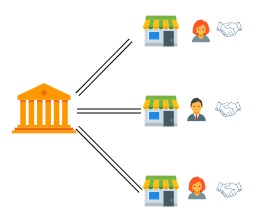
A chain of stores / multiple brands of one owner |
An online marketplace |
| Who manages products |
You (the system owner) |
Each vendor lists their own products |
| Commission / payouts to third parties |
None |
Yes — commission splits and vendor payouts |
| Best when |
You want several websites/domains for one business |
You want to invite others to sell and earn commission |
In short: Multi-Store = many stores that are all yours; Multi-Vendor = one marketplace for many sellers. If you need a marketplace model, look at the Multi-Vendor plugin instead of Multi-Store.
3. Free vs Pro
Multi-Store comes as a Free edition (free, enough to get started) and a Pro edition (unlocks every feature for large-scale operations).
| Feature |
🆓 Free |
⭐ Pro |
| Number of stores |
Up to 3 (including the root store) |
Unlimited |
| Multiple domains, a distinct interface per store |
✅ |
✅ |
| Per-store language & currency |
✅ |
✅ |
| Per-store configuration |
✅ |
✅ |
| Strict domain validation (STRICT) |
✅ |
✅ |
| Dedicated administrator per store (logs in on that store's domain) |
— |
✅ |
| Sync products to stores (publish root products to many stores, keep the source link) |
— |
✅ |
| Unified dashboard (compare revenue / orders / average order value across stores, export to Excel) |
— |
✅ |
| Product revenue report across the whole system (with per-store clones) |
— |
✅ |
| Lock / unlock a store (the platform owner pauses a store) |
— |
✅ |
- Choose Free when: you are starting out, need up to 3 stores, and manage everything yourself.
- Upgrade to Pro when: you need more than 3 stores, want to hand each store to its own administrator, or need consolidated system-wide reports.
🚀 Link MultiStore PRO: https://gp247.net/en/product/multi-store-pro.html
4. Two everyday workflows
🛍️ Getting a product into a store — two ways
- Way 1 — Post it directly in the store: the store's administrator (store-admin) logs in on the store domain and creates the product there. It belongs to that store. (In the root admin, the platform owner can also create a product and pick the store it belongs to — available since the Free edition.)
- Way 2 — Publish from the root site: the platform owner opens the "Sync products to stores" screen, picks a root product + target store + category, then clicks Publish. Each store gets an independent copy that keeps a link back to the source product, so it can be re-synced when the source content changes.
- Applies to single products only (bundles/groups are not supported yet).
- The published copy defaults to draft status (not for sale) and price 0 — set the price and enable selling before it goes live, to avoid selling at 0. Each store's own price and stock are always preserved on re-sync.
👤 Granting a user store-admin rights
Open the "Store administrators" screen (administrators only):
- Pick the User to grant (not administrator / view-all).
- Pick the Store to grant (the root ROOT store cannot be chosen).
- Pick a Role (store-scoped) — optional. Two presets ship ready to use: Store Admin (the store's full business scope, including configuration & reports) and Store Member (day-to-day operations: products, orders, customers, content). You can still create or pick other roles.
- Click Assign store admin.
Once assigned, the user becomes a store administrator: they log in on the store's domain, see only that store's scope, and cannot reach the root admin (a security separation — see Conditions). Importantly, whatever roles or permissions they are granted, store administrators are always blocked from platform-wide actions (installing/removing plugins, global configuration, users/roles, store management…) and from any data outside their store — this boundary is enforced by the system, independent of how you assign permissions. Remove the grant with Revoke. One account cannot be both root staff and a store administrator — use two separate accounts if a person needs both roles.
Install from the command line (CLI, gp247 3.x)
Since gp247 3.x you can install both MultiStore and MultiStorePro from the GP247 library on the command line. Open a terminal in the website's root folder and run:
# 1) Once per website: register the (free) API License that connects the site to the GP247 library
php artisan gp247:ext-register-license

# 2) Install the free edition first (skip if already installed)
php artisan gp247:ext-install --type=plugin --key=MultiStore

# 3) Install Pro with the license you received on purchase
php artisan gp247:ext-install --type=plugin --key=MultiStorePro --paid --license=<your-license>
- Run two separate commands as above: a paid extension is installed one key at a time, never together with
MultiStore in one command.
<your-license> is the license GP247 issues for your domain after purchase — not the free API License from step 1.- Before step 1, make sure
APP_URL in .env is the website's real domain (not http://localhost) — the license is bound to that domain.
- Once installed, the plugin is enabled and caches are refreshed automatically; nothing else is needed in the admin.
- The command checks the requirements declared in
gp247.json (core 3.0, gp247/shop, required plugins, the rule against installing alongside Multi-Vendor) and stops with a clear message if something is missing.
- If the plugin folder is already in
app/GP247/Plugins/ (copied manually or unpacked from the zip), the command installs it in place instead of downloading it again.
- The command refuses a plugin that is already installed. To move to a newer version, run
php artisan gp247:ext-update --type=plugin --key=MultiStorePro.
- Append
--json to get machine-readable output (for scripts/CI).
- More: Extension installation guide.
Documentation
The detailed guides live on the GP247 documentation site — one source, always the current version:
| Document |
Contents |
| Overview |
What Multi-Store is, the problem it solves, how it differs from Multi-Vendor, Free vs Pro |
| Setup |
Install and enable the plugin, create the first store, point a domain at it, verify |
| Operations |
Per-store settings, getting products into stores, admin rights, orders and reports |
| Customisation |
Per-store look and feel, wording, developer hooks |
| Product page |
gp247.net — Multi-Store Pro |
| Vietnamese version of this README |
README_vi.md |
Conditions & Rules (know before you use it)
- Cannot be installed alongside Multi-Vendor — Multi-Store and multi-vendor are different models that share store data in conflicting ways. The system blocks installation if a multi-vendor plugin is present; remove the other plugin first, then install.
- The Free edition is limited to 3 stores (including the root store) — enough to get started; to add more, upgrade to Pro. This is the line between the two editions, not an error.
- The root (ROOT) store cannot be locked — the root store is the foundation of the whole system; locking it would take everything down, so this action is always blocked (locking is a Pro feature).
- Platform requirements: requires
gp247/shop and runs on GP247 core 3.0 or later. This is an S-Cart/GP247 plugin, not a standalone product.
Q&A
Q1: Do I need to build a separate website for each store?
→ No. You install one system; each store is a domain pointing to that same system, all managed together in one admin panel.
Q2: Can each store have its own interface, language, and currency?
→ Yes. Each store configures its own template, language, currency, and settings — even though they share one platform.
Q3: Should I choose Multi-Store or Multi-Vendor?
→ Choose Multi-Store if all the stores are yours. Choose Multi-Vendor if you want different sellers on a marketplace and you collect commission.
Q4: How many stores can the Free edition run?
→ Up to 3 stores, including the root store. If you need more, upgrade to Pro (unlimited).
Q5: What is the most valuable thing Pro adds?
→ Per-store administrators, syncing products to many stores, a unified dashboard, system-wide revenue reports, and store locking — built for running many stores for real.
Q6: If I'm on Free and later upgrade to Pro, do I lose data?
→ No. Pro extends Free on the same platform; upgrading unlocks more features while your existing store data stays intact.
Q7: Where can I try it before deciding?
→ The public demo site: https://demo.s-cart.org
Q8: Why can't I install it together with a multi-vendor plugin?
→ The two models share store data differently, and running them together would corrupt data. The system blocks it to protect you; pick just one model that fits.
Q9: Where do I find detailed installation and configuration?
→ In the Setup guide and the Operations guide on gp247.net (the Documentation section above lists all four pages). Buying the Pro edition is covered on the product page.
📅 Last updated: 2026-10-22 · ✍️ Author: GP247



![[InOut] Purchase, Return, Cash Flow Management Plugin](https://static.gp247.net/product/in-out.png)